
From invoice intake to reviewable finance data.
InvoiceOps connects document understanding to the operational work buyers need: extraction, verification, review, search, and accounting-ready export.
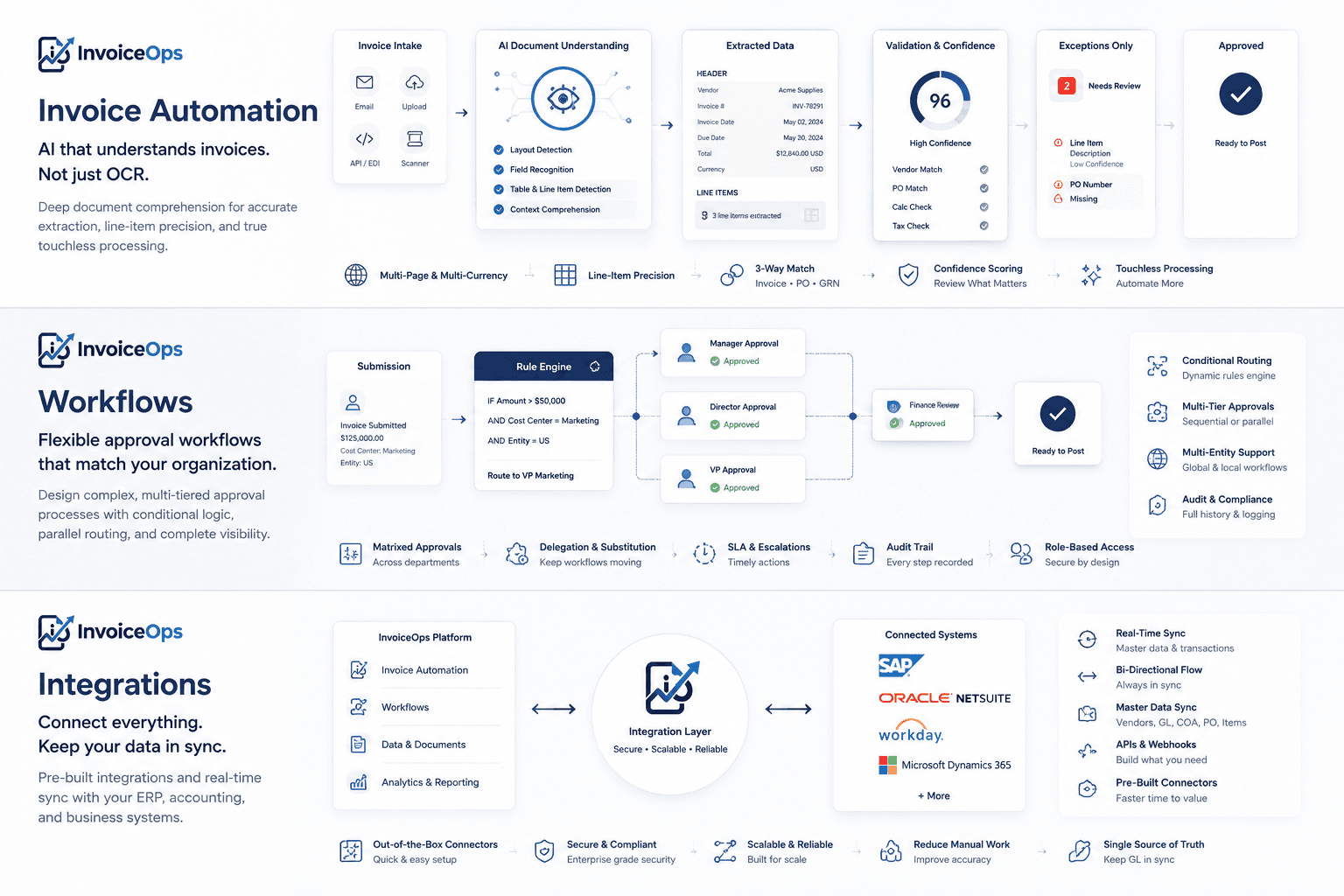
Move from standard capability to the right implementation depth.
Use the core platform directly, explore workflow and integration paths, or bring complex legacy and business-logic requirements into a scoped custom engagement.
Invoice Automation
Capture, extract, validate, review, search, and prepare invoice data for accounting handoff.
ExploreWorkflows
Connect exception review, approvals, authorization, and controlled accounting movement.
ExploreIntegrations
Start with structured exports and supported QuickBooks workflows, then assess broader requirements.
ExploreCustom Development
Engineer scoped connectors, proprietary rules, exports, and orchestration on top of InvoiceOps.
ExploreSystem flow
These are the steps that turn invoice PDFs into reviewable, searchable, accounting-ready records.
Upload or intake
Bring invoices into the workflow from upload, batch upload, and planned email intake paths.
Storage and queue
Keep documents organized for processing, review, search, and export.
Extraction engine
Recover layout, tables, tokens, fields, line items, and invoice entities.
Verification
Cross-check values with confidence, source evidence, conflicts, and missing-evidence states.
Review
Let finance users approve, edit, and preserve the original extraction history.
Export or handoff
Move validated data into CSV, XLSX, JSON, QuickBooks export, and future ERP sync paths.
Document intelligence foundation
Concrete invoice engine capabilities that buyers and technical evaluators can believe.
Clean PDFs stay fast
Use deterministic document understanding first, then OCR and image-table fallback when scans need visual reconstruction.
Difficult tables recovered
Handle bordered tables, sparse tables, dashed separators, key-value sections, scanned tables, and invoice summaries.
Values stay traceable
Attach page, source block, table cell, and bounding-box evidence so reviewers can verify values against the original document.
Confidence is explained
Show whether a value came from deterministic extraction, grounded AI, agreement, conflict, or missing evidence.
Three checks before finance exports.
The strongest competitive advantage is not extraction alone. It is the ability to explain, verify, and review invoice values before they reach accounting workflows.
Understand the document
Deterministic parsing reconstructs layout, metadata, sections, text blocks, tokens, tables, and page-level confidence.
Extract grounded values
AI enrichment maps invoice fields and line items from source candidates rather than returning disconnected text.
Verify hard cases
A separate visual verification path can inspect difficult PDFs, scans, and table layouts before values reach review.
Latest insights
- Updated Jul 20, 2026Advanced AP Automation: Beyond Basic Platform Features
As AP automation becomes standard, learn what advanced capabilities like AI extraction, custom workflows, and human oversight truly offer your finance team.
- Updated Jul 20, 2026Advanced Invoice Approvals for Agentic Finance Systems
Learn how advanced invoice approval workflows enhance security and efficiency in agentic finance. Explore conditional routing, human oversight, and source evidenc...
- Updated Jun 17, 2026Beyond "Magic": Real AP Automation with Trust and Accuracy
This article discusses how the InvoiceOps platform delivers genuine efficiency and accurate, reviewable data, directly aligning with the comprehensive platform offering. It highlights the value proposition of the platform.
- Updated Jun 17, 2026Full InvoiceOps Workflow: Email to Accounting-Ready Bill
This article describes the end-to-end workflow of the InvoiceOps platform, from capture to accounting sync. It provides a comprehensive overview of the platform's capabilities.
- Updated Jun 17, 2026Invoice Extraction: From OCR to LLM-Enhanced Precision for AP
This article details the evolution of the platform's core extraction technology, from OCR to LLM-enhanced precision. It explains the technological foundation of the InvoiceOps platform.
Frequently asked questions