Every vendor looks different
PDFs, scans, tables, and field labels change from one invoice to the next.

Turn vendor invoices into structured, reviewable, accounting-ready records with AI extraction, source evidence, approval workflows, search, and supported QuickBooks handoff.
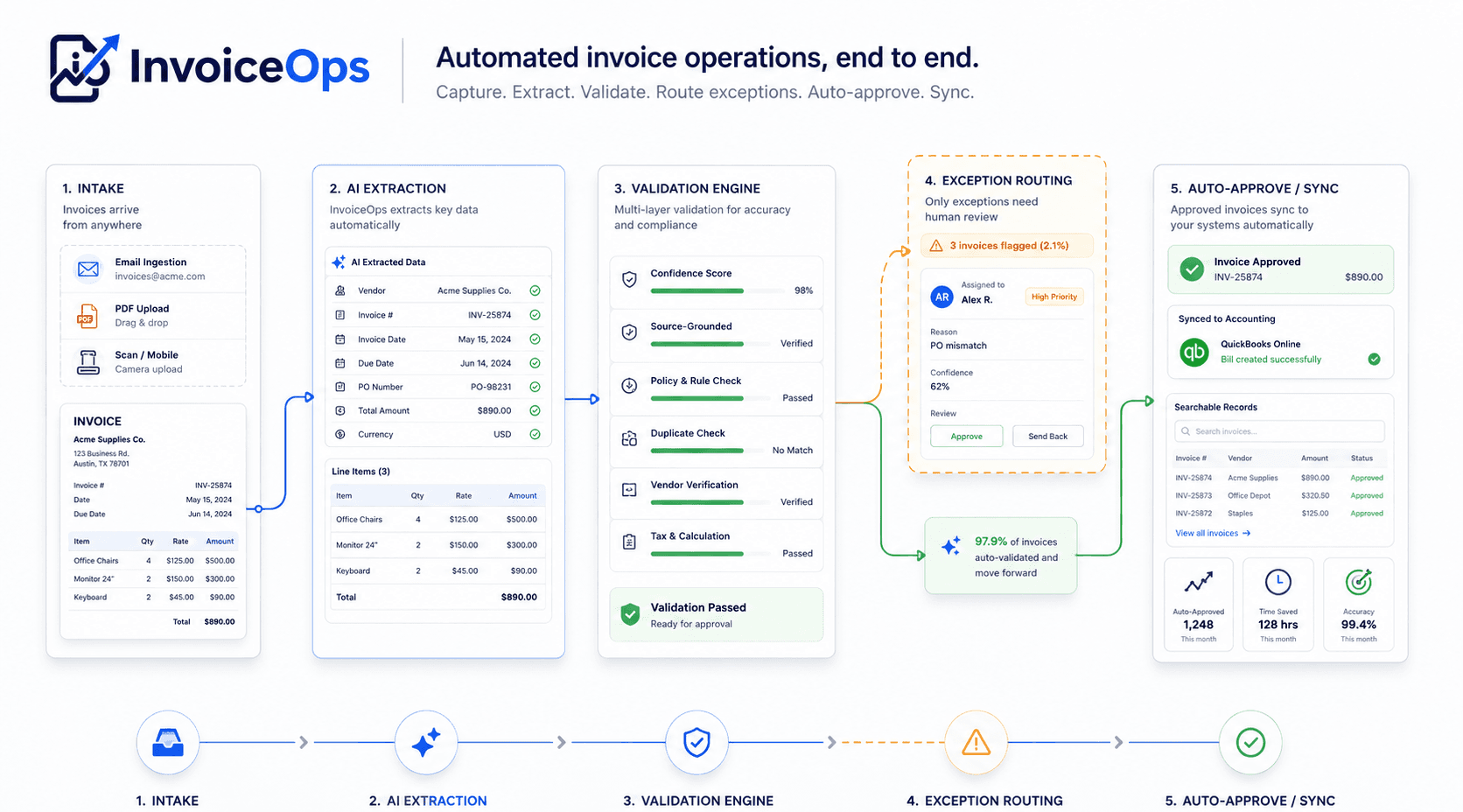
This overview connects the complete InvoiceOps workflow. Each focused page goes deeper into one operational capability.
Coordinate intake, review, status, and accounting handoff.
Capture fields, line items, confidence, and source evidence.
Route exceptions and keep approval history connected.
Recover quantities, descriptions, prices, and table structure.
Find invoices and line items by vendor, PO, amount, or status.
Move accepted records into export or supported QuickBooks workflows.
Invoice automation captures invoice data, validates important fields, routes exceptions for review, collects approvals, and sends clean records to accounting workflows without manual retyping.
A complete workflow covers more than OCR. It connects intake, extraction, line items, validation, human judgment, search, audit history, and accounting handoff.
PDFs, scans, tables, and field labels change from one invoice to the next.
Descriptions wrap, columns shift, and multi-page tables lose their relationships.
Status, context, and accountability become difficult to follow across a team.
A clean bill record is only as reliable as the data and review behind it.
InvoiceOps automates repetitive document work while keeping exceptions, approval, and downstream action visible to finance.
Different approaches solve different parts of the problem. InvoiceOps focuses on the reviewable path from invoice document to usable finance record.
| Approach | What it does | Where the boundary appears |
|---|---|---|
| Manual entry | People read invoices and type the bill data. | Slow, inconsistent, and difficult to scale. |
| Basic OCR | Converts document images into machine-readable text. | Text alone is not a validated accounting record. |
| Generic AI | Returns document fields from a broad extraction model. | Results can be difficult to verify without evidence and workflow state. |
| Heavy AP suites | Cover broad procure-to-pay and payment operations. | Can exceed the scope, cost, and implementation needs of focused teams. |
| InvoiceOps | Extracts, validates, reviews, approves, searches, and hands off invoice data. | Focused on controlled invoice operations rather than global procurement or payments. |
InvoiceOps does not simply return a vendor name, total, or line item and ask your team to trust it. Extracted values stay connected to their source so reviewers can verify uncertainty before approval.

The useful unit is not an AI field in isolation. It is a record finance can inspect, resolve, find again, and move forward.
Click an extracted vendor, PO number, total, or line item and compare it with the connected source region before accepting the record.
Explore invoice extractionLow-confidence fields, missing evidence, suspected duplicates, and validation issues can move into review while clean records keep moving.
Explore approval workflows
Search by vendor, invoice number, PO, amount, status, or line-item detail, then export or use supported QuickBooks workflows after review.
Explore deep invoice search
Each team enters the process with a different question. The shared record keeps extraction, review, status, and source context aligned.
Stop retyping vendor bills and keep invoice records searchable from the beginning.
Explore solutionProcess client invoices with consistent review state, evidence, and structured outputs.
Explore solutionReduce manual entry, route exceptions, and keep invoice status visible across the team.
Explore solutionRetrieve vendor, PO, amount, and line-item context when a dispute or question arrives.
Explore solutionInvoiceOps is intentionally focused on practical invoice intake, review, search, and accounting handoff.
InvoiceOps prepares invoice data for controlled review and accounting handoff. It does not replace your accounting system or hide uncertainty behind an AI label.
Visit all InvoiceOps FAQsInvoice automation is the controlled process of capturing invoice data, validating important fields, routing exceptions for review, collecting approvals, and moving accepted records into accounting workflows without manually retyping every document.
OCR converts document images into text. Invoice automation adds invoice structure, line-item capture, validation, source evidence, review state, approvals, search, and accounting handoff around that text.
Yes. InvoiceOps can recover line items from text-native, image-backed, and scanned invoice PDFs, including varied table layouts. Uncertain or incomplete rows remain reviewable rather than being treated as unquestioned data.
InvoiceOps supports controlled review and approval workflows with visible status and history. The exact routing and email-assisted experience depends on the configured product workflow and plan.
InvoiceOps supports reviewed invoice handoff through supported QuickBooks export and synchronization workflows. CSV, XLSX, and JSON exports are also available for other accounting processes.
Yes. Extracted values can retain page, source block, table cell, and bounding-box evidence so a reviewer can compare the structured value with the original invoice.
Low-confidence values, missing evidence, conflicting results, totals mismatches, suspected duplicates, and other issue signals can move the invoice into exception review.
InvoiceOps is designed for focused invoice workflows, including small businesses and accounting teams that want to reduce retyping, keep review control, and prepare cleaner accounting records.
Yes. Authorized users can search invoice records using vendor, invoice number, PO, amount, date, status, extracted fields, and line-item descriptions.
No. InvoiceOps prepares invoice data for review, approval, search, export, and accounting handoff. Your accounting system remains the system of record for the downstream accounting workflow.
Latest insights
As AP automation becomes standard, learn what advanced capabilities like AI extraction, custom workflows, and human oversight truly offer your finance team.
Learn how advanced invoice approval workflows enhance security and efficiency in agentic finance. Explore conditional routing, human oversight, and source evidenc...
This article clarifies the relationship between AP automation and invoice automation, which is foundational for understanding the software's scope. It helps position InvoiceOps within the broader AP landscape.
This article directly discusses how InvoiceOps delivers genuine efficiency and accurate, reviewable data, aligning with the "reviewable AP workflows" aspect of the page. It addresses common pain points in AP automation.
This article details the end-to-end workflow, from invoice intake to accounting handoff, which are key aspects of the automation software described. It provides a comprehensive view of the software's capabilities.
Frequently asked questions
Use the included credits to inspect extracted fields, line items, confidence, validation, and source evidence on your own documents.